Budget vs actual on every project
Each project page shows Budget used next to unbilled, invoiced, and paid totals, with your hours climbing toward the budget line. Log time and watch it move.

Give a project an hours limit, a dollar limit, or both, then watch budget vs actual update as you log time and expenses. Monthly retainers included.
Start budgeting freeGive a project an hours limit, an amount limit, or both, and see whichever is closer to its cap.
Past 90%, the time entry form shows what’s left, like “5h left in time budget”, before you submit.
Turn on Reset monthly and each calendar month starts from zero with its own remaining hours or dollars.
Hours and cost charts on every project, with a dashed line marking your hours budget.
Dollar budgets count hours at your contract’s rates plus billable expenses with markup.
Projects ranked by budget used, with a count of how many are over or near their limit.
Each project page shows Budget used next to unbilled, invoiced, and paid totals, with your hours climbing toward the budget line. Log time and watch it move.
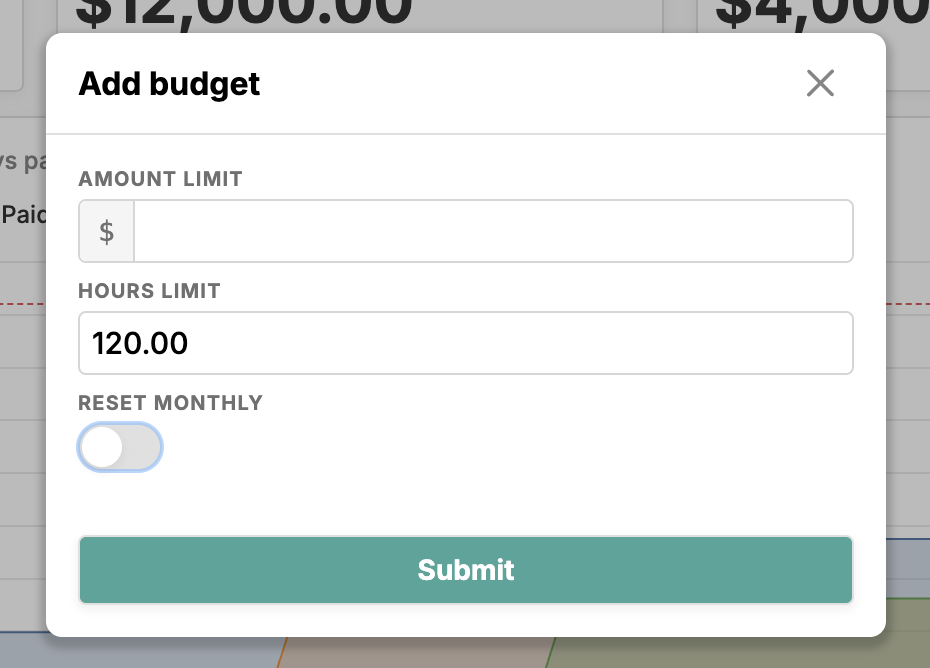
Click Set budget, enter an amount limit, an hours limit, or both, and choose whether it resets monthly.
The Project budgets widget on your dashboard ranks open projects by how much budget they’ve used, so you know which need attention.
Monthly budgets get month-by-month charts. Each month starts from zero, and you always see what remains in the current one.
Most budget overruns aren’t a surprise in hindsight. The hours were logged, the expenses were in, and nobody added them up until the invoice. Happy Hours adds them up as the work happens, because budgets live on the same projects as your time tracking and expense tracking.
Open a project, click Set budget, and give it an amount limit, an hours limit, or both. With both, Happy Hours tracks each separately and reports whichever is closer to its cap, so a project can’t quietly blow through its hours while the dollars still look fine.
An hours limit counts every hour logged on the project, billable or not, because that time was spent either way. An amount limit counts billable value: your hours at the project’s rates, plus billable expenses with markup, straight from the contract you set up in project management. Change the limits any time and everything recalculates.
Budget vs actual updates the moment you save a time entry. The project page shows how much of the budget is used and what’s left, beside your unbilled, invoiced, and paid totals, and the hours chart plots your time against the budget line.
Once a project passes 90%, the time entry form tells you what’s left as you type, like “5h left in time budget”, and once you’re over it says by how much. That works wherever you log time.
Retainers are one toggle. Turn on Reset monthly and the budget counts only the current calendar month. The project shows what’s remaining this month, and the charts switch to month-by-month views you can page through.
Each month starts from zero against the same limit, so a 40-hour retainer gets a fresh 40 hours every month, and unused hours don’t roll over. Paging back shows which months came in under and which ran over, which helps when a client asks where their hours went.
Your dashboard ranks open projects by how much of their budget is used, with a summary like “1 over · 1 near limit”, and the projects list shows the same bar on every row. It’s a quick way to see which projects need attention and which clients need a conversation about scope.
Budgets fit fixed-price work too. A fixed-price project shows the margin left, the price minus what your time and expenses have cost so far, and your effective hourly rate once you’ve invoiced, so you learn which quotes were too low. When an approved quote becomes a project through estimates, its contract and rates come with it, and at billing time the same hours and expenses become line items in invoicing.
Either, or both. Each project’s budget has an Amount limit and an Hours limit, and you can fill in one or both. With both set, Happy Hours tracks each one, warns you about whichever trips, and shows the one closest to its limit in the Budget used total. Hours budgets suit work scoped by time; dollar budgets suit work scoped by fee.
A dollar budget counts billable value. Each billable time entry is worth its hours times the rate of its time type, which comes from the project’s contract, and billable expenses are added with the contract’s expense markup. Non-billable time and expenses you absorb don’t count toward the dollar limit, though non-billable hours still count toward an hours limit.
Turn on Reset monthly and the budget counts only the current calendar month. The project page shows what’s remaining this month, and the hours and cost charts switch to month-by-month views you can page through. Each month starts from zero against the same limit, so you can see which months ran over. Unused hours don’t roll over to the next month.
Yes, on screen. Once a project passes 90% of its budget, the time entry form shows what’s left as you type, such as “5h left in time budget”, and the project page shows a warning banner. Over the limit, both say by how much, such as “0.5h over time budget”. Budget warnings live in the app; Happy Hours doesn’t send budget emails.
Yes. Set an hours limit to cap the time you put into a fixed fee. Alongside Budget used, a fixed-price project shows Margin left (the fixed price minus your time at contract rates and expenses at cost) and, once you’ve invoiced, your effective hourly rate. The fixed price doesn’t become the budget automatically, so you choose the limit you want to work to.
Yes. Hours budgets, dollar budgets, and monthly retainers are part of the single $10/month plan, alongside time tracking, expenses, and invoicing. There are no feature tiers, and you can try everything free for 14 days. See pricing for details.