Profitability for any project, client, or period
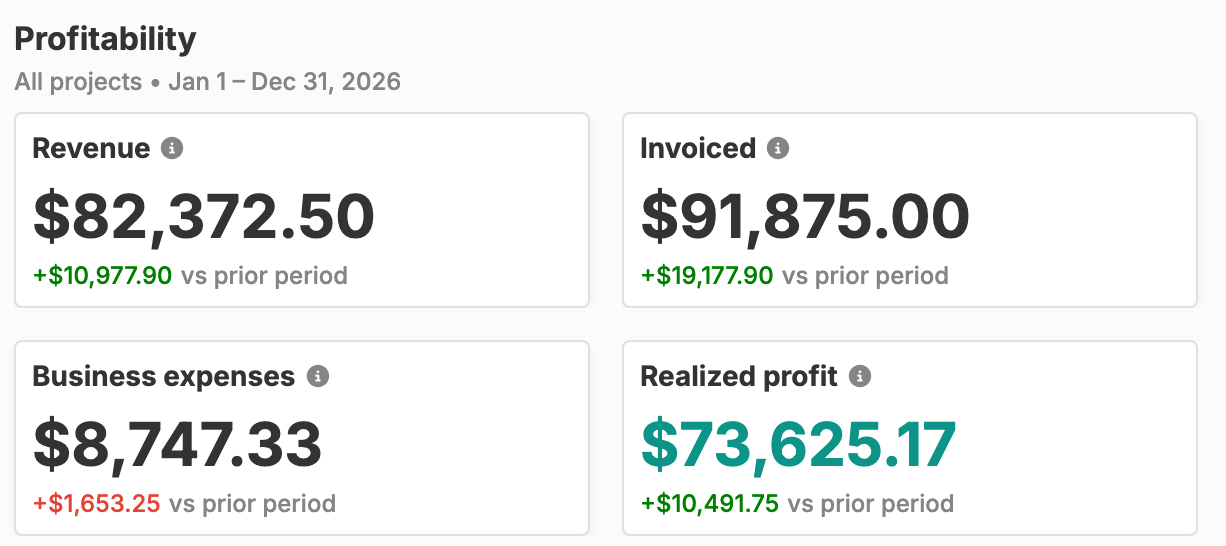
Revenue, Invoiced, Business expenses, and Realized profit, each with its change against the period before. Narrow it to one project or one customer with a single filter.

Revenue, realized profit, unbilled work, and who still owes you, built from the time, expenses, and invoices you already track.
Start freeRevenue, invoiced, business expenses, and realized profit for one project, one customer, or everything.
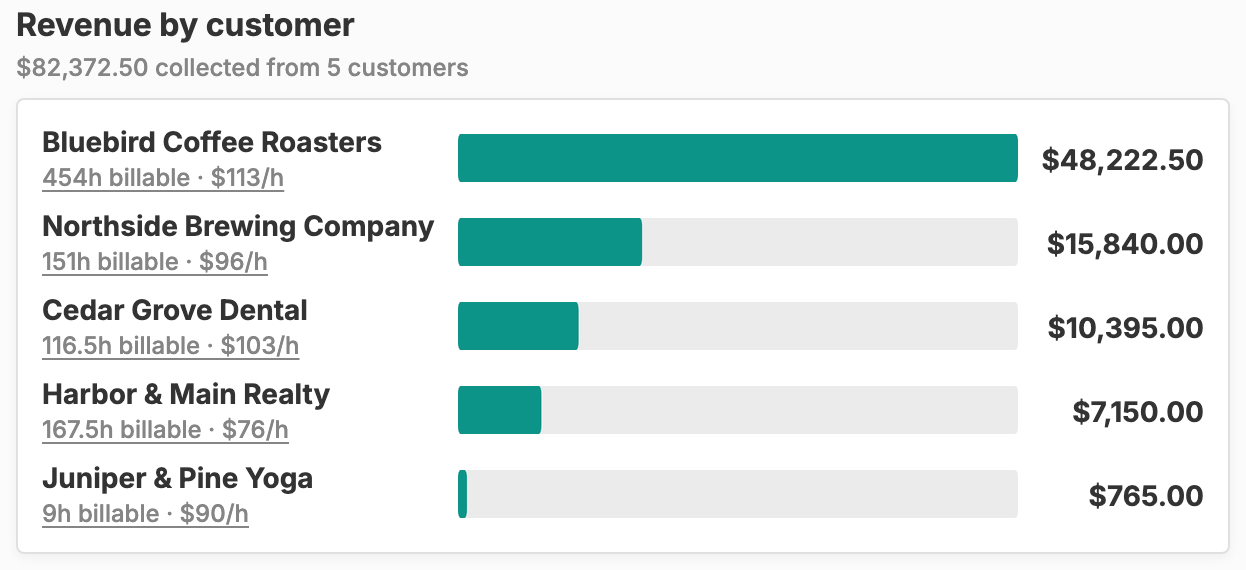
Clients ranked by what they have paid you, with billable hours and hourly rate.
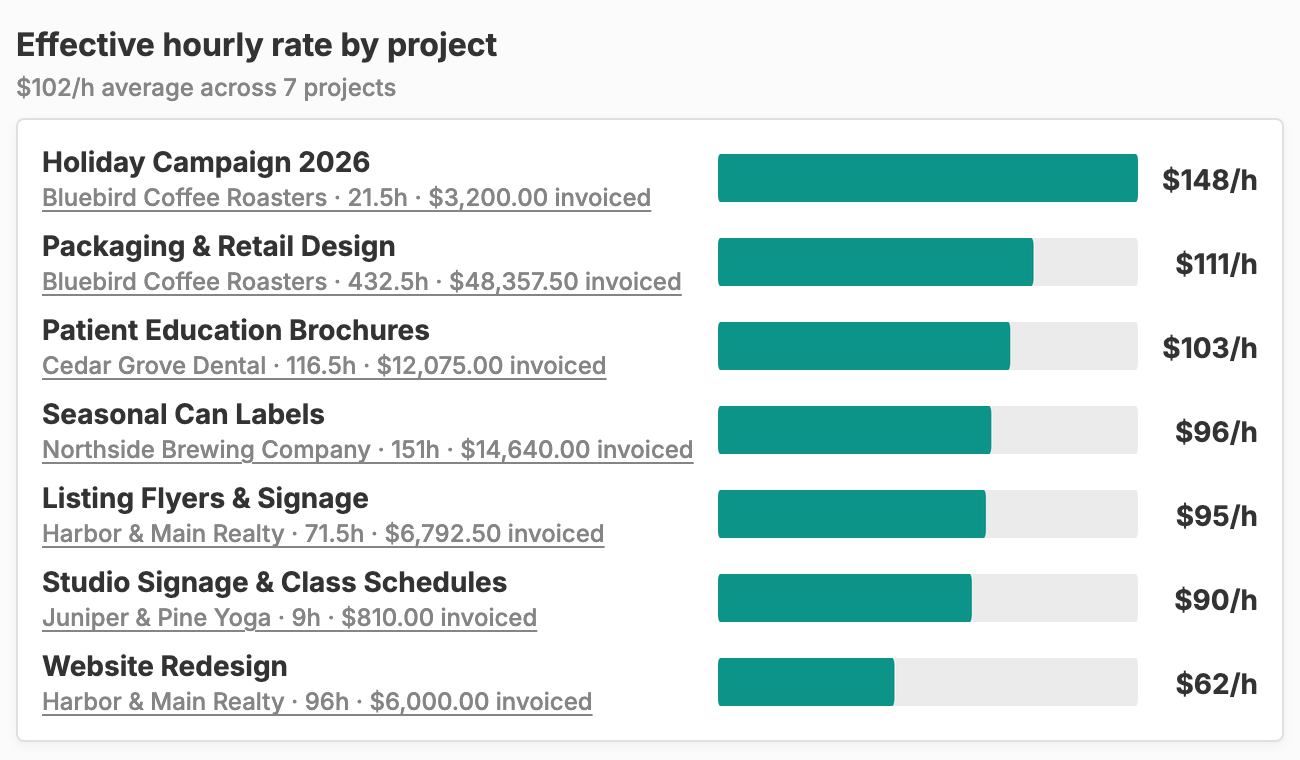
What each project really earns per hour, fixed-price work included.
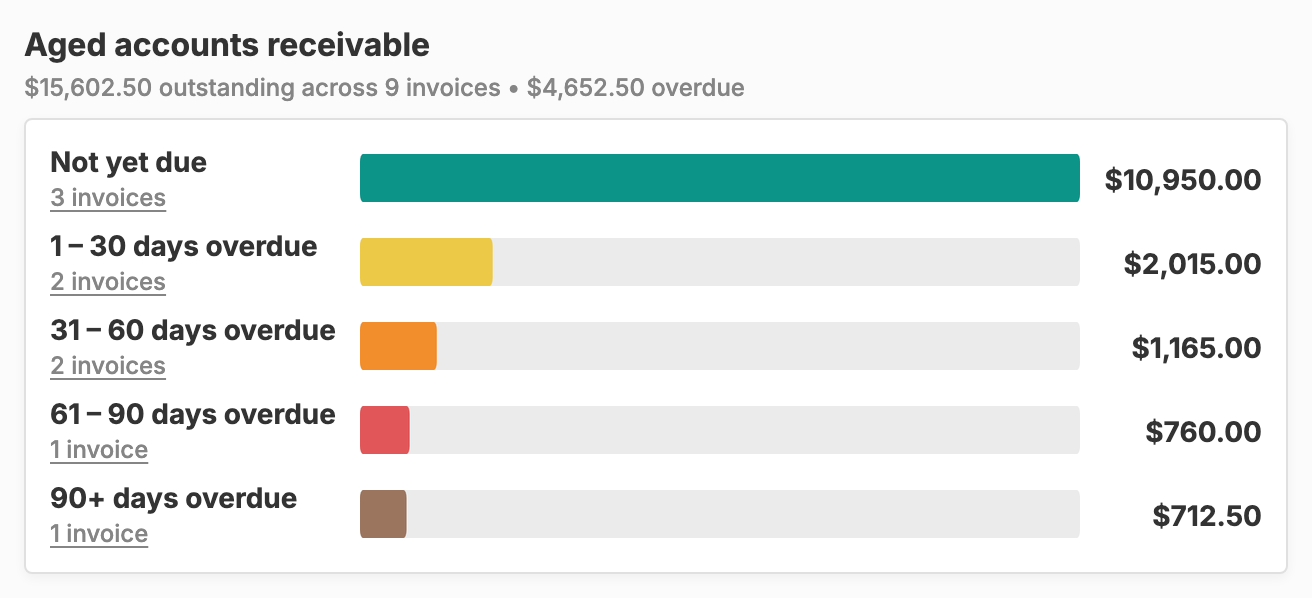
Unpaid invoices from Not yet due to 90+ days overdue, one click from the invoices in each bucket.
Billable time and expenses you have not invoiced yet, valued at your rates.
What is due to come in each week for the next 13 weeks.
Revenue, Invoiced, Business expenses, and Realized profit, each with its change against the period before. Narrow it to one project or one customer with a single filter.
Every client ranked by what they have paid you, with their billable hours and effective hourly rate underneath.
What each project really earned per hour you logged, fixed-price work included, ranked against your average.
Sent invoices sorted by days past due, from Not yet due to 90+ days overdue. Click a bucket’s invoice count to open those invoices.
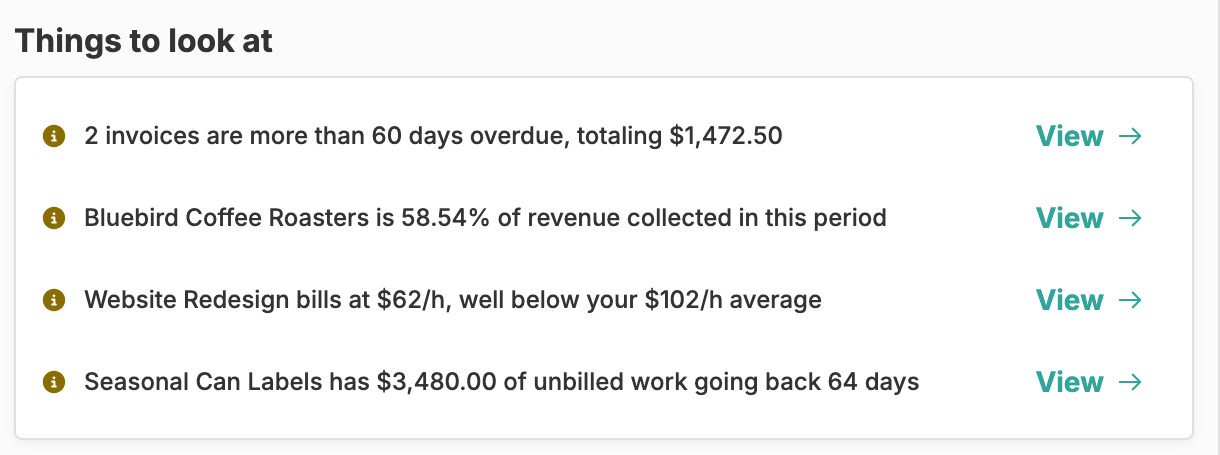
Happy Hours flags what needs you: long-overdue invoices, a client bringing in half your revenue or more, an underpriced project, and work left unbilled.
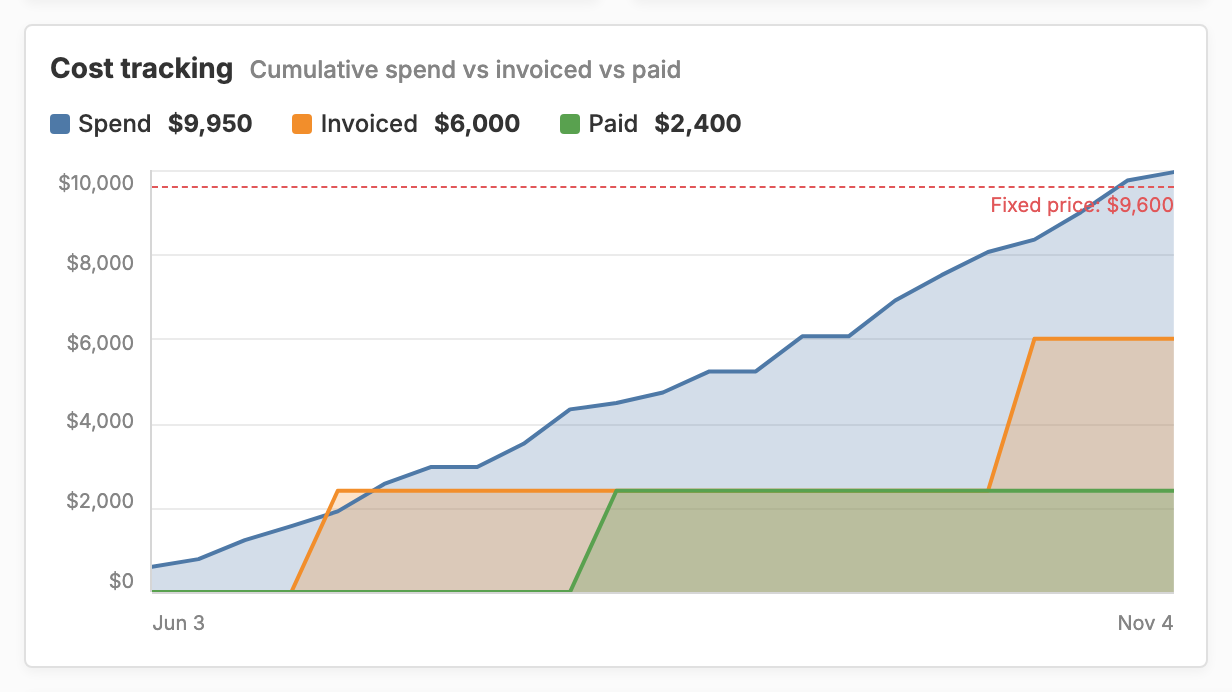
Each project page charts the value of the work you have logged against what you have invoiced and what has been paid, with the fixed price or budget as a line to stay under.
Most freelancers find out how a project went when they do their taxes. Happy Hours shows you while the work is still happening. Your time tracking, expense tracking, and invoicing already live in one place, so the insights build themselves, with nothing to import and no spreadsheet to keep in sync.
Profitability comes down to four numbers. Revenue is the invoices paid in your date range, money that has actually come in. Invoiced is what you sent. Business expenses are the costs you don’t bill back. Realized profit is revenue minus every expense, including the ones you passed through to clients. Each number also shows how it moved against the period before.
Profit alone doesn’t tell you what your time is worth, so Happy Hours also ranks your projects by effective hourly rate: what you invoiced divided by the billable hours you logged. Fixed-price projects count too, which is where a quote that looked great on paper can turn out thin. Rates and contracts live in project management, and each project page charts the same numbers against its budget.
Revenue by customer ranks every client by what they have paid you, with their billable hours and hourly rate beside each name. Pick a customer in the filter and the whole page narrows to their work. Pick a project to see one job on its own.
Filter by this month, quarter, or year, the last one of each, or any custom range. A monthly trend charts collected, invoiced, and expenses over time, and a quarterly table sets each quarter next to last year’s total.
Aged accounts receivable sorts your sent invoices by days past due: not yet due, 1–30, 31–60, 61–90, and 90+ days. Each bucket shows its count and total, and clicking the count takes you to those invoices, ready to follow up.
Receivables by customer shows who owes what and how long each client usually takes to pay, and expected collections lays out the next 13 weeks of invoices by due date, so you can see when money should arrive. To move those numbers along, let clients pay by card or bank transfer with online payments, or mark an invoice paid yourself when a check arrives. Either way, it leaves the aging chart.
Unbilled work lists the billable time and expenses you haven’t invoiced yet, valued at your rates: money you’ve earned but haven’t asked for. Under Things to look at, Happy Hours also flags what deserves your attention, like invoices more than 60 days overdue, a client who makes up half your revenue, a project billing well below your average rate, or unbilled work that has sat for a month.
When a client wants the detail, generate a PDF. A time card lists your hours by day for one project and date range, with an optional signature block. An expense report itemizes the project’s expenses and can include the receipts in the same file.
Revenue is the invoices paid in your date range, counted on the day they were paid. Invoiced is what you sent in that range. Realized profit is revenue minus every expense in the range, including ones you billed back to clients. It does not subtract a cost for your own hours; for that, look at your effective hourly rate on each project.
Yes. Revenue by customer ranks every client by what they have actually paid you, with their billable hours and effective hourly rate next to it. Pick a customer in the filter to see revenue, invoiced, business expenses, and realized profit for just their work, and narrow it to a month, a quarter, or a year.
An A/R aging report groups your unpaid invoices by how late they are. Happy Hours sorts sent invoices by days past their due date: Not yet due, 1–30, 31–60, 61–90, and 90+ days overdue, with the count and total for each. Click a bucket’s invoice count to open those invoices and start following up.
Two client-ready PDFs, each for one project and any date range: a time card with your hours by day and an optional signature block, and an expense report that can include your receipts in the same file. The Insights page itself is an on-screen view; there is no CSV or spreadsheet export.
No. Happy Hours is time tracking, invoicing, and payments for freelancers, with insights built from that data. It answers questions like which projects pay best and who owes you money. It does not produce a P&L or balance sheet and does not sync with QuickBooks or Xero, and we would rather tell you that up front.
Yes. Happy Hours is $10 per month with everything included, and financial insights and report generation are part of that. You can try it free for 14 days with no credit card.