Calendar view
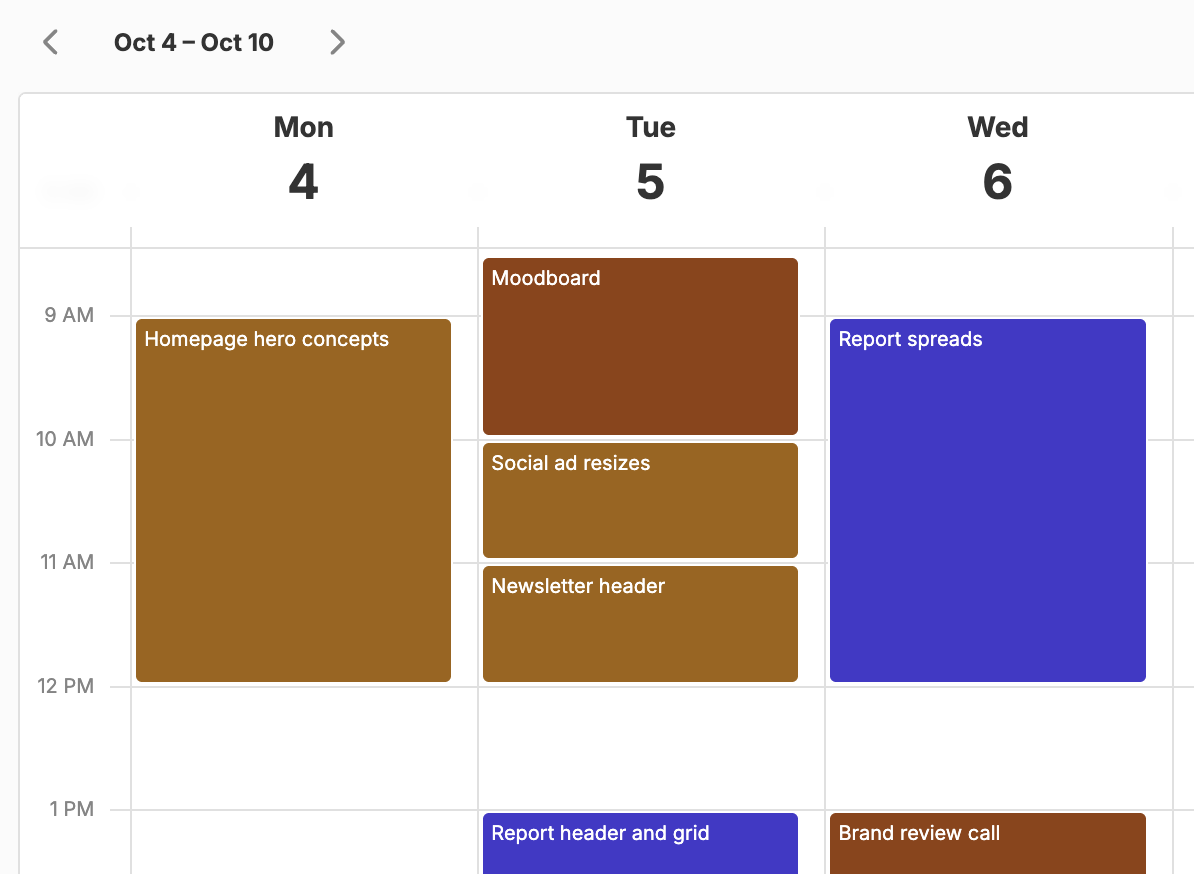
Click or drag to create entries on a weekly calendar, then move and resize them to match your day.

Track time in no time. Log billable hours by client and project, see them against your budget, and turn them into invoices in minutes.
Start tracking freeClick the calendar for a one-hour entry or drag out any length. Entries snap to 15 minutes, and you can drag them to another day.
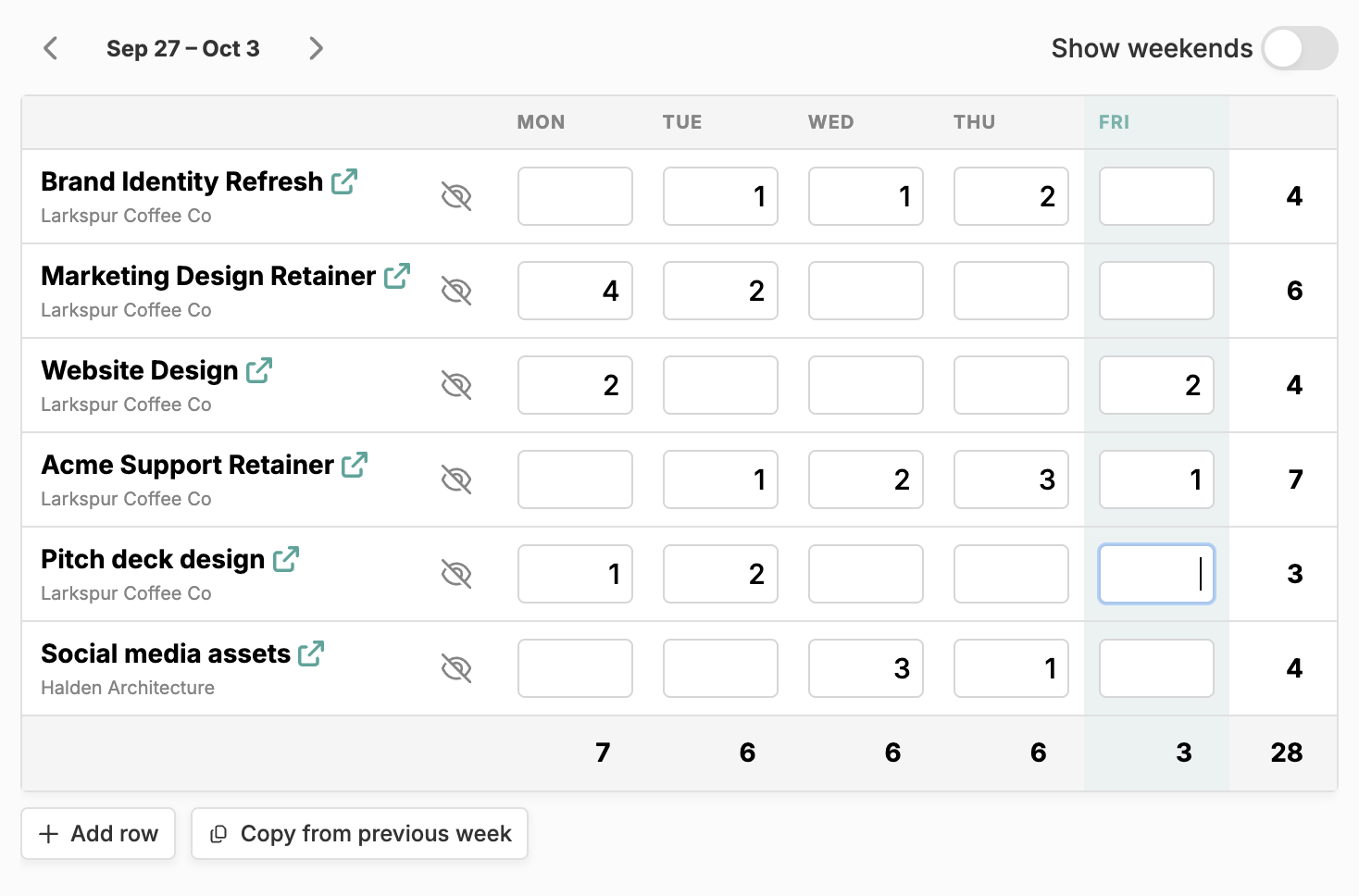
Type hours for every project and day in one grid, move between cells with the arrow keys, and see the week’s totals.
Give a project an hours or dollar budget. Past 90%, the time entry form shows what’s left as you type the hours.
Give a project several named hourly rates, mark one as the default, and pick the time type each entry bills at.
Send a client a project time card with your logo, the project’s PO number, a column of hours per rate, and an optional signature block.
Filter your entries to what’s un-invoiced, then add them to an invoice as one line per project and rate.
Click or drag to create entries on a weekly calendar, then move and resize them to match your day.
Fill in a whole week across all your projects at once, with totals for every project, day, and the week.
Happy Hours is time tracking software for freelancers, consultants, and small agencies that bill clients for their time. The hours you log sit on a project for a client, carry that project’s hourly rate, count against its budget, and are ready to drop onto an invoice. No exporting a timesheet from one tool and retyping it into another.
Some days you think in blocks of time; some days you just need the week filled in. Happy Hours gives you both, as two views of the same entries. In the calendar view, click an empty slot for a one-hour entry or drag out a block of any length, then add a description and project. Drag an entry to move it, even to another day, and drag its bottom edge to change the duration. Everything snaps to 15 minutes.
In the time grid, projects are rows and days are columns. Type decimal hours into a cell, use the arrow keys to move to the next one, and the grid adds up each project, each day, and the week. Copy from previous week brings last week’s projects across so you only have to fill in the numbers.
Sketch your day on the calendar and tidy up the week in the grid on Friday: a grid cell is simply the total of that project’s entries for the day. Happy Hours runs in your browser and adapts to phone and tablet screens, so you can log a site visit from your phone and pick it back up at your desk.
Rates live on the project’s contract, set up once in project management. Add as many hourly rates as the work needs, say Design at $130/h and Site visit at $95/h, and mark one as the default. The time entry form picks the project’s default for you, and you can switch it whenever a job mixes different kinds of work.
Not every project is billed by the hour. On fixed-price projects, paid as a lump sum or in milestones, you can still track your time, and once you’ve invoiced something the project page shows your effective hourly rate, so you can see whether a flat fee actually paid off.
Every entry has a Billable switch, on by default. Turn it off for admin, sales calls, or the extra round of revisions you decided not to charge for. Non-billable time stays out of invoices, unbilled totals, and dollar budgets, but it still counts toward an hours budget, because those hours were still spent. Time cards show it in its own Unbillable column.
Click Set budget on a project and give it a limit in hours, in dollars, or both, total or resetting monthly. Every entry counts against it, and the project page shows how much of the budget is used and what’s left, remaining this month for a monthly budget. Once a project passes 90%, the time entry form warns you while you type, for example “2h left in time budget”, before you submit. Budgeting covers budget vs actual in more detail.
When it’s time to bill, start an invoice for the project. Happy Hours lists the billable time that hasn’t been invoiced yet; select the entries you’re billing and they become line items, one per project and rate, with the total hours as the quantity. Add expenses and tax, send it, and your client can pay online by card or bank transfer. Invoicing walks through the whole flow.
The time entries list has an Un-invoiced filter and a Linked invoice column, so nothing slips through between billing cycles. Void an invoice and its hours go back to un-invoiced automatically. The same hours feed financial insights, which flags unbilled work and shows your effective hourly rate by project.
You enter it afterwards; Happy Hours doesn’t have a start/stop timer. Click or drag out blocks on the calendar, or type hours for each project and day in the weekly time grid, and a whole week takes a couple of minutes.
Yes. Add as many named hourly rates to a project’s contract as you need, for example design and site visits, and mark one as the default. When you log time in the entry form, it starts on the default rate and you can switch the time type. Invoices use those rates, with one line per project and rate.
Start an invoice and, on the Line items step, open Time entries: Happy Hours lists your billable entries that haven’t been invoiced yet. Select the ones you’re billing and they become line items, grouped by project and rate. Send the invoice and your client can pay online by card or bank transfer, or you can mark it paid when a check arrives.
Yes. Every time entry has a Billable switch, on by default. Non-billable hours never land on an invoice and don’t count toward unbilled totals or dollar budgets, but they do count toward hours budgets, so you can see the real effort a project takes. Time card PDFs list them in a separate Unbillable column.
Yes. Happy Hours is a web app that adapts to phone and tablet screens, so the calendar and time grid work wherever you are. On a touchscreen, press and hold the calendar, then drag to create an entry. On iPhone you can add Happy Hours to your home screen for one-tap access.
Time tracking is included in the one Happy Hours plan: $10/month with unlimited projects, customers, time entries, expenses, and invoices. There are no per-seat fees or feature tiers. Start with a 14-day free trial, no credit card required. See pricing for details.
There’s no self-serve import yet, so past time entries stay in your old tool. To get going quickly, book a setup call and we’ll bring your clients and projects across and set up your first project, so you can start logging time against them on day one.