
Create a professional estimate in minutes
- 1Enter your info
- 2Enter your client's info
- 3Set estimate details and line items
- 4Download your professional estimate PDF
Try for free · No account needed
Free estimate generator features
Free, with no account
No signup, no email verification, no captcha, and no cap on how many estimates you make.
Live preview of the PDF
The preview is drawn the same way as the PDF, so the estimate you check is the estimate you send.
Price every line
Quantity times rate, an optional flat discount per line, and one tax rate on the subtotal.
Your logo and details
Upload a logo and add your phone and address so the estimate looks like it came from your business.
Picks up where you left off
Your draft saves in this browser as you type, and your business details carry over from the invoice builder.
Download a polished PDF
One click gives you a portrait PDF in the Modern template, ready to send with your pitch.
How the free estimate generator works
The free estimate generator turns a short form into a PDF estimate you can send a client before the work starts. There’s no account and no email gate: fill in the job, check the preview, and click Download PDF. Every field is optional, and you can make as many estimates as you like.
Add your details and your client’s
Under Your info, enter your name or business name and your email. Add details opens a short dialog for your logo, phone number, and address; once they’re saved they show as small chips, and the button becomes Edit details. If you’ve used the free invoice builder in the same browser, these are already filled in.
Client info takes your client’s name and email, with phone and address under Add details. On the estimate, they appear under “Estimate for”.
Set the estimate number and dates
The estimate number starts at 1010; type your own to match your records. The date defaults to today. Estimates have a due date too, set 30 days out by default. Nothing is owed on an estimate, so treat it as the date you need an answer by, or how long your price holds.
Price the work line by line
Each line has a description, a rate, a quantity (1 by default), and an optional discount, and the amount is calculated for you: quantity times rate, minus the discount. Descriptions can run to several lines, which helps when a line needs to spell out what’s included. Add as many lines as you need.
Hourly work reads best as hours times your hourly rate. Fixed-price work can be one line for the whole job or one line per phase, each with a quantity of 1. An $800 discovery phase plus 30 hours of build at $95 an hour, for example, gives an estimate total of $3,650. Discounts are flat dollar amounts, and the Tax % field applies one rate to the whole subtotal.
Say what the price covers
An estimate is only as useful as its assumptions. Use the Notes field to set out the scope, what’s not included, how many rounds of revisions you’ve allowed for, how long the price is good for, and whether you’ll ask for a deposit. Use the Memo for a short note to your client, such as the project name.
Preview, then download your PDF
On a computer, the form is on the left and a live preview of the estimate on the right, updating as you type. On a phone, a bar at the bottom shows the running estimate total, with buttons to open the full preview or download.
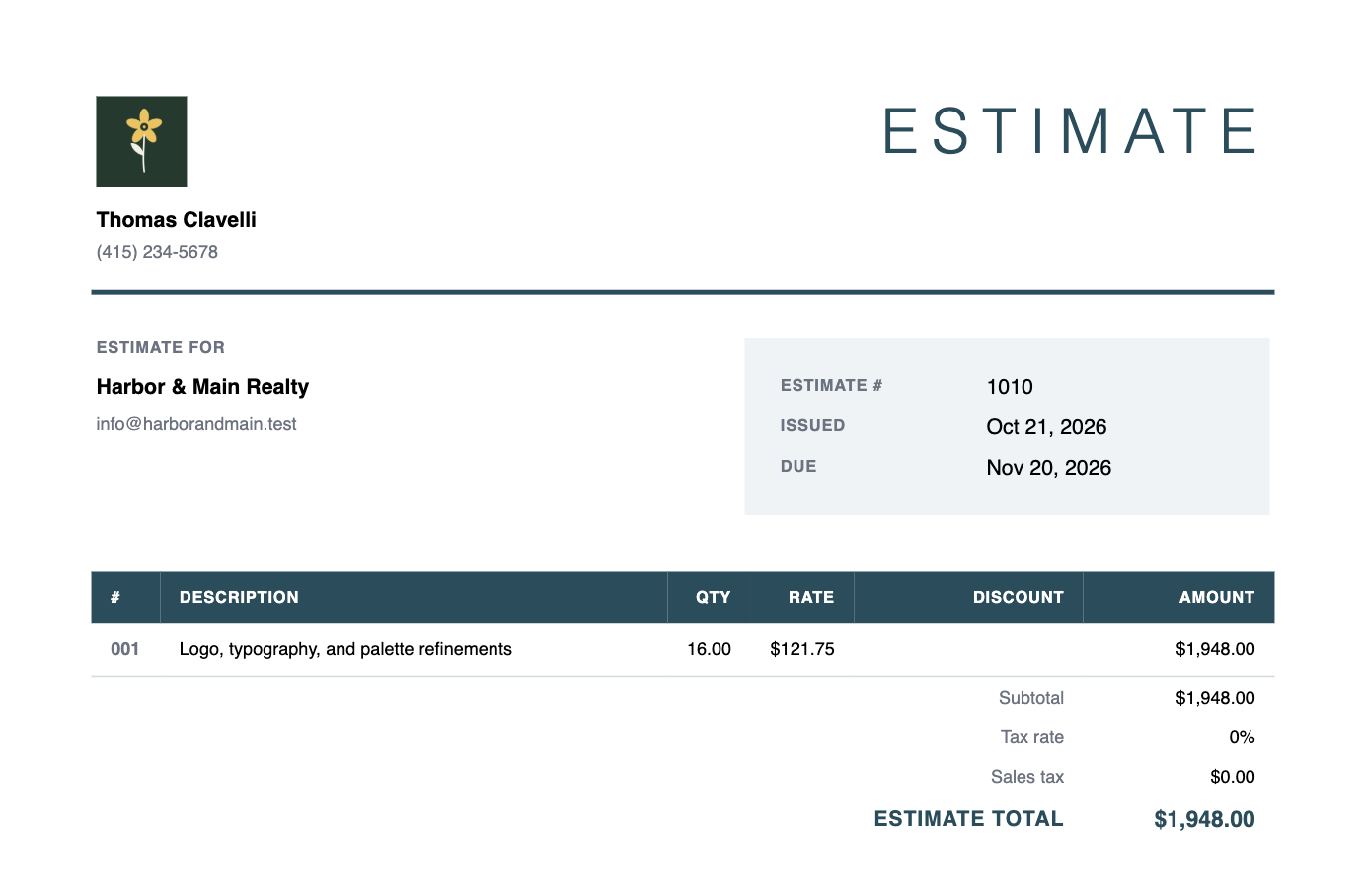
Free estimates use the Modern template. Classic, Swiss, and Block are there to preview, and need a Happy Hours account to download. The PDF is made on our server and saved straight to your device, named after your estimate number. It’s a portrait page with your logo, both sets of contact details, the dates, the line items with their discounts, the subtotal, tax, and estimate total, then your memo and notes.
Your draft saves itself
Your estimate is saved in your browser as you type and comes back if you reload. The estimate builder keeps its own draft, separate from the invoice builder’s, but the two share your business details, so whichever you use second starts with your name, email, phone, address, and logo filled in.
Estimate vs. invoice: what’s the difference?
An estimate is a price before the work; an invoice is a bill after it. You send an estimate so a client can see what a job will cost and decide whether to go ahead. Once the work is done, you send an invoice asking them to pay what they owe by a due date. The two can list the same line items, rates, discounts, and tax, but they ask the client for different things: first a decision, then a payment.
The free estimate builder is the twin of the free invoice builder. Same form, same Modern template. Here’s what changes:
| EstimateThis builder | InvoiceFree invoice builder → | |
|---|---|---|
| Sent | Before the work starts | When the work is done, or at an agreed milestone |
| Tells the client | What the job will cost if they go ahead | What they owe you, and by when |
| Client’s next step | Says yes, asks for changes, or passes | Pays you |
| Title on the PDF | Estimate | Invoice |
| Client block | “Estimate for” | “Bill to” |
| Total line | “Estimate total” | “Total due” |
| Notes field | “Notes”, for scope, assumptions, and what’s not included | “Notes / payment terms”, for how and when to pay |
| Due date | 30 days out by default; use it as the date your price is good until | 30 days out by default; the date payment is due |
| File name | estimate_1010_happyhours.pdf | invoice_1010_happyhours.pdf |
| With an account | Mark it approved or rejected, then turn it into an invoice or a project | Email it to your client, let them pay online, and see when it’s viewed |
Everything else is the same in both: the form, line items, discounts, tax, and the free Modern template.
Estimate, quote, or proposal?
Most freelancers use “estimate” and “quote” for the same thing: a priced list of work, given before it starts. Some trades draw a line, treating a quote as a fixed price and an estimate as a best guess. If the difference matters to your client, say which you mean in the Notes. The PDF is always titled “Estimate”.
A proposal usually goes further, setting out goals, approach, and timeline in prose. The estimate is the price that goes with it, so attach the PDF to your proposal, or send it on its own when the price is the only open question.
When the client says yes
An estimate doesn’t ask for money, so nothing gets paid from it. When you’re ready to bill, whether that’s a deposit up front or the full amount once the work is delivered, make an invoice in the free invoice builder. In the same browser, your business details will already be filled in. Add the line items, updating anything that changed along the way.
If you quote regularly, a Happy Hours account keeps every estimate on file. You mark each one approved or rejected, and an approved estimate becomes a draft invoice, with the same customer, line items, discounts, and tax, or a project you track time against, in one step. Read more about estimates and invoicing.
Free estimate generator FAQ
Is the estimate generator free?
Yes. There’s no account to create, no email to verify, and no limit on how many estimates you make or download. Every field is optional. Each free PDF carries a small “Made with Happy Hours” mark in the bottom-right corner, which a Happy Hours account removes.
What is the difference between an estimate and an invoice?
An estimate comes before the work: it tells your client what a job will cost so they can decide whether to go ahead. An invoice comes after: it asks them to pay for work you’ve done, by a due date. When you’re ready to bill, use the free invoice builder, which works the same way.
Is an estimate the same as a quote?
For most freelance work, yes: both are a priced list of work given before the job starts. Some trades treat a quote as a fixed price and an estimate as a best guess, so if that matters, say which you mean in the Notes. The free builder titles the document “Estimate”.
Can I turn my estimate into an invoice?
Not in the free tools. Open the free invoice builder in the same browser and your business details will be filled in, but you’ll need to add the line items again. In a Happy Hours account, an approved estimate becomes a draft invoice in one step. See estimates.
Why does my estimate have a due date?
The estimate builder includes a due date, set 30 days from today by default. Nothing is owed on an estimate, so use it as the date you need an answer by, or how long your price is good for, and change it to suit the job.
Does the estimate generator save my estimates?
It saves your current draft in your browser as you type and remembers your business details for next time. It doesn’t keep a list of past estimates, and nothing syncs to other devices or carries into a Happy Hours account, so keep the PDFs you download.
Can I add my logo or use a different currency?
You can add a logo: under Your info, choose Add details to upload it along with your phone number and address. Amounts are in US dollars only; the builder doesn’t offer other currencies or number formats.
What happens to the details I enter?
Your draft is saved in your browser. When you download, the estimate is sent to Happy Hours to generate the PDF, and we keep a record of your business details, the dates, totals, and line items. Your client’s name and contact details aren’t part of that record. See our privacy policy.
Sending estimates regularly?
Create a Happy Hours account to access more templates, track which estimates are approved, and turn approved estimates into projects or invoices your clients can pay online.