
Track hours,
Get paid,
Be happy.
Time tracking, expense management, and invoicing for professionals.$10/month, everything included.
14 days, no credit card.
It's always Happy Hours somewhere.
Financial data secured by

Streamline your key workflows
Know which projects really pay off
Add unlimited projects and customers — we’ll celebrate your company growth with you!
Track project milestones, or set hourly rates and an expense markup for time & expense contracts.
Visualize progress against fixed-price or budgets.
See budget used, margin left, and effective hourly rate on every project.
Track time in no time
Log hours instantly, fully integrated with budgeting, invoicing, and reporting.
Log hours with one click, visualize on the calendar or the weekly timesheet view.
Create hours budgets, and see warnings as a time entry gets you close to the limit.
Configure time types to track work at varying hourly rates.
Build invoices in minutes with pre-filled line items from time entries.
Expense tracking that feels like magic
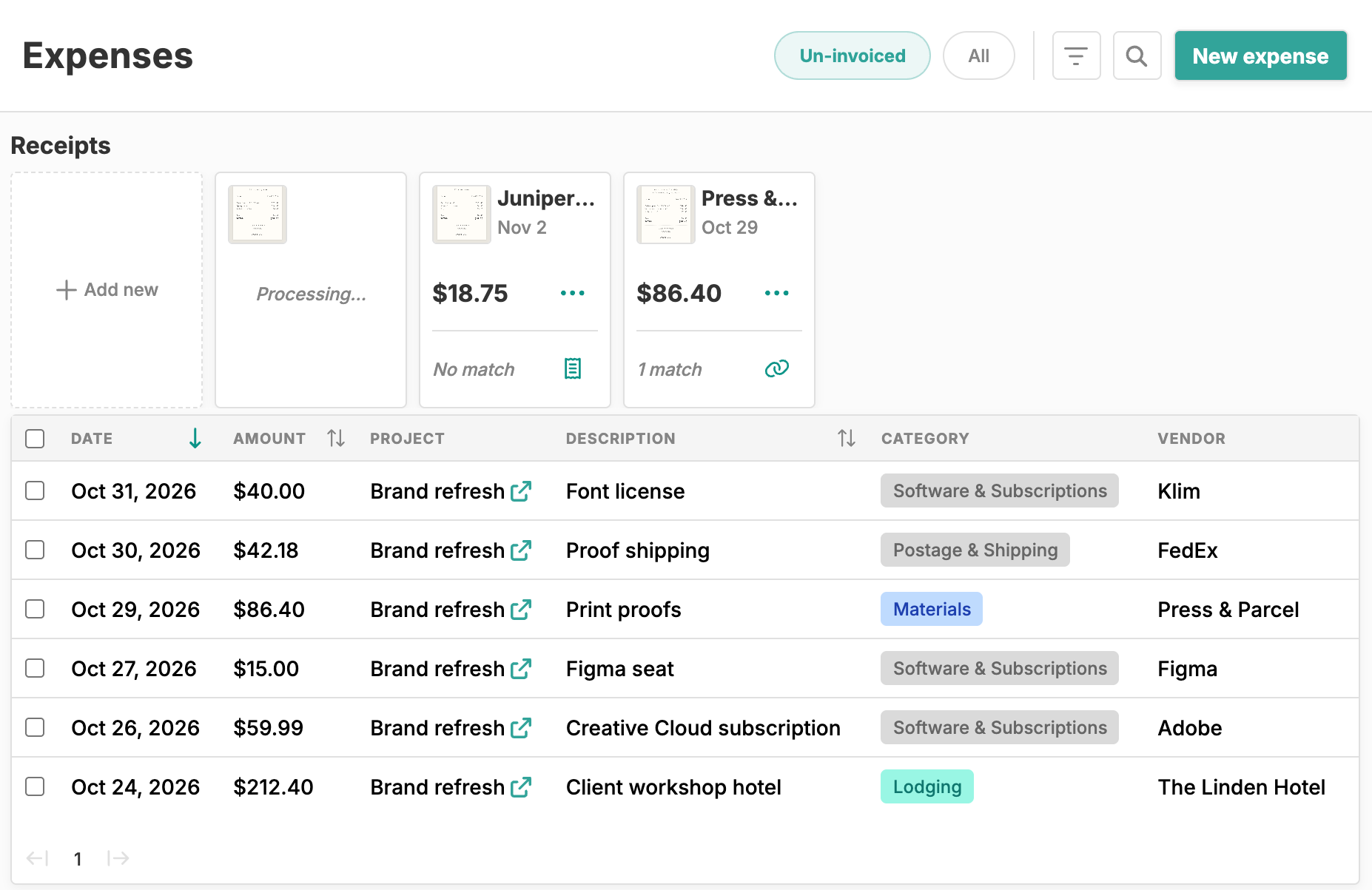
Sync your bank, snap your receipts, and never miss a deductible expense again.
Link your bank and card accounts with Plaid and match imported transactions to expenses.
Snap a pic of your receipts and Happy Hours AI will parse the data.
Automatically generate line items on your invoices.
Generate expense reports for your clients.
Spot cost overruns before they happen
Set budgets in hours or dollars, with optional monthly resets for retainer-style work.
Compare actuals vs budget with helpful visuals.
See warnings when a time entry gets you close to your budget.
See your projects ranked by budget used on your dashboard.
Turn a yes into an invoice
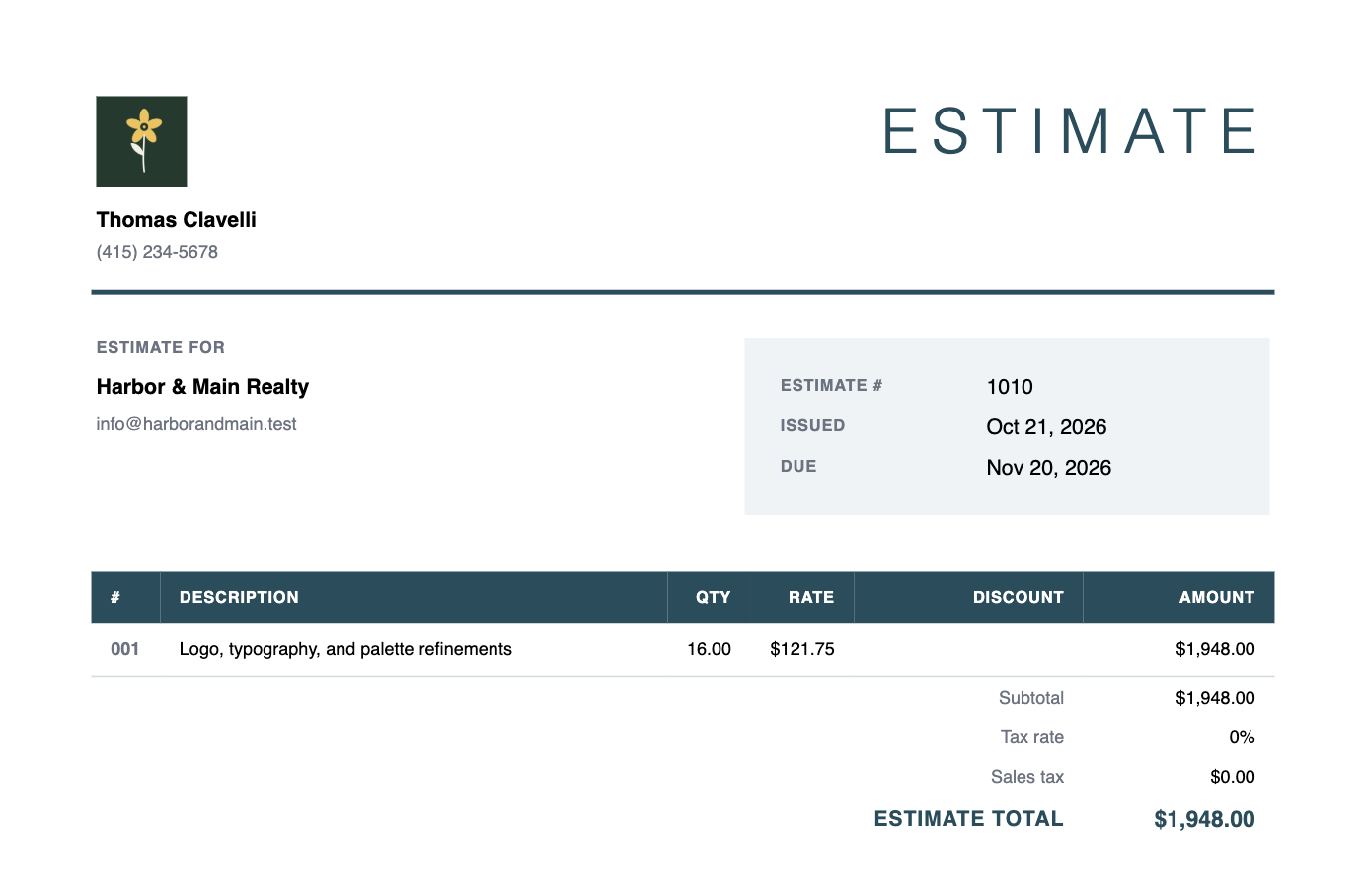
Build professional estimates and quotes, then invoice the approved ones without retyping a thing.
Watch a live PDF preview as you build each estimate.
Turn approved estimates into invoices or projects with the same line items.
Choose from professionally designed templates.
See which estimates are pending, approved, overdue, or converted.
Invoice in minutes, not hours
Import line items from tracked time, expenses, or milestones.
Use our professionally designed invoice templates to impress your clients.
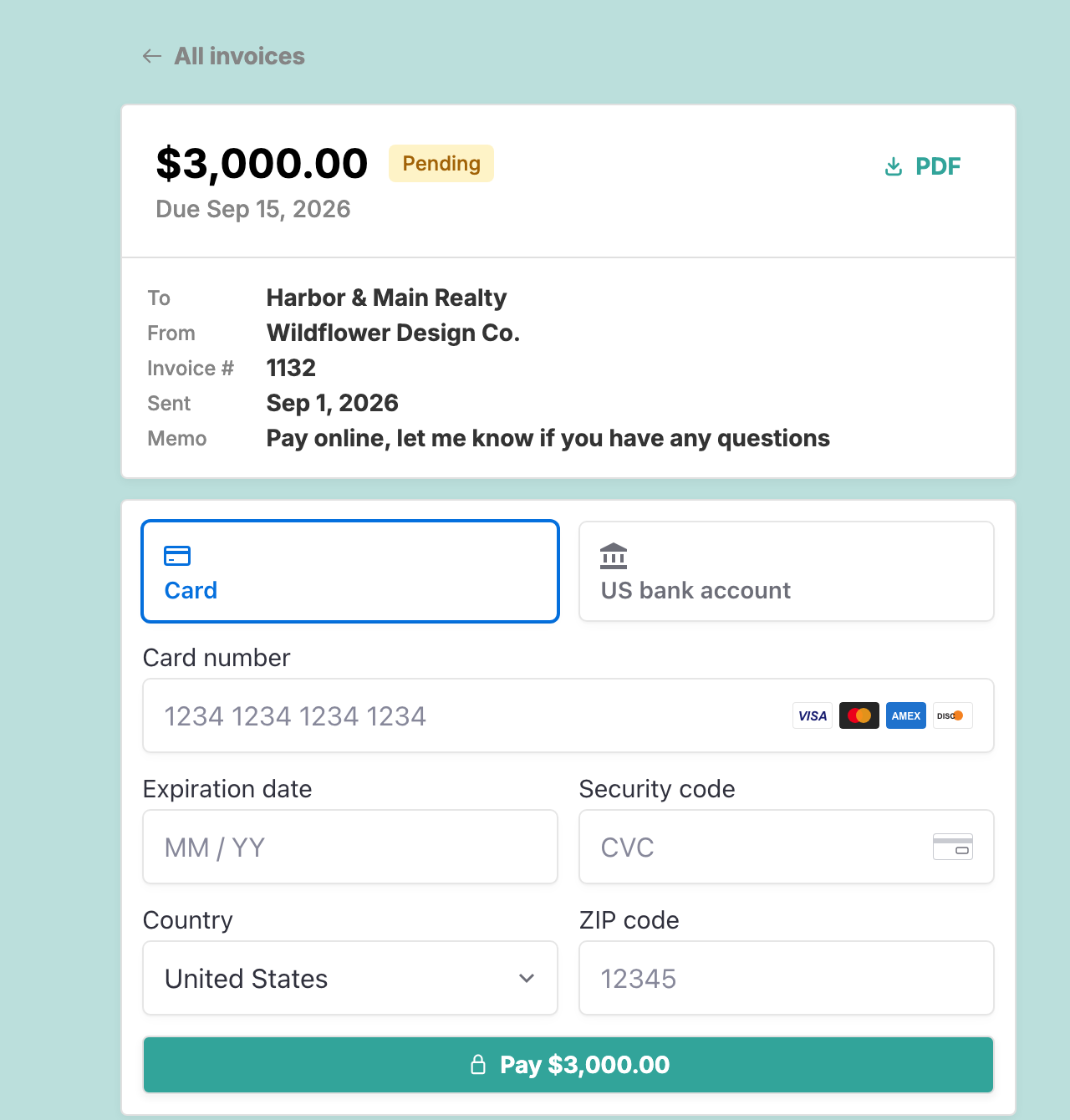
Get paid online via Stripe — preview your client payment portal, branded with your logo and business details.
See which invoices are overdue and how long each client takes to pay.
Shred those paper checks
Keep more of what you earn — pay only 0.8% capped at $5 on bank transfers or 2.9% + 30¢ on card payments.
Impress your customers with a professional payment portal.
Track when customers view emails and payment pages.
Receive your payments in as little as 2 business days.
See key business metrics at a glance
See unpaid invoices by days overdue, plus work you haven’t invoiced yet.
Filter business metrics by project or customer to see where you’re making money.
How Happy Hours compares
| Feature | Happy Hours | Harvest | Bonsai | Toggl |
|---|---|---|---|---|
| Time tracking | Yes | Yes | Yes | Yes |
| Timesheet view | Yes | Yes | *Yes, but only in higher tiers or with usage fees | Yes |
| Calendar view | Yes | Yes | No | Yes |
| Timesheet approvals | No | *Yes, but only in higher tiers or with usage fees | No | *Yes, but only in higher tiers or with usage fees |
| Expense tracking | Yes | Yes | *Yes, but only in higher tiers or with usage fees | *‡Yes, but only in higher tiers of Toggl Work, a separate product |
| Automatic receipt parsing | Yes | No | No | *‡Yes, but only in higher tiers of Toggl Work, a separate product |
| Automatic bank & card transaction import | Yes | No | *Yes, but only in higher tiers or with usage fees | No |
| Project management | Yes | Yes | Yes | Yes |
| Unlimited projects & customers | Yes | *Yes, but only in higher tiers or with usage fees | Yes | Yes |
| Time & expense contracts | Yes | Yes | *Yes, but only in higher tiers or with usage fees | *Yes, but only in higher tiers or with usage fees |
| Fixed-price contracts | Yes | Yes | *Yes, but only in higher tiers or with usage fees | *Yes, but only in higher tiers or with usage fees |
| Task granularity | No | Yes | Yes | Yes |
| Budgeting | Yes | Yes | *Yes, but only in higher tiers or with usage fees | *Yes, but only in higher tiers or with usage fees |
| Hours budgets | Yes | Yes | *Yes, but only in higher tiers or with usage fees | *Yes, but only in higher tiers or with usage fees |
| Dollar budgets | Yes | Yes | *Yes, but only in higher tiers or with usage fees | *Yes, but only in higher tiers or with usage fees |
| Retainers | Yes | Yes | *Yes, but only in higher tiers or with usage fees | *Yes, but only in higher tiers or with usage fees |
| Estimates | Yes | Yes | *Yes, but only in higher tiers or with usage fees | No |
| Convert approved estimates to invoices | Yes | Yes | *Yes, but only in higher tiers or with usage fees | No |
| Invoicing | Yes | *Yes, but only in higher tiers or with usage fees | *Yes, but only in higher tiers or with usage fees | Yes |
| Pre-fill line items from time & expenses | Yes | Yes | *Yes, but only in higher tiers or with usage fees | Yes |
| Customizable invoice templates | †Yes, but limited preset options | †Yes, but limited preset options | †Yes, but limited preset options | No |
| Multi-currency | No | Yes | *Yes, but only in higher tiers or with usage fees | Yes |
| Client portal | Yes | Yes | *Yes, but only in higher tiers or with usage fees | No |
| Online payments | Yes | *Yes, but only in higher tiers or with usage fees | *Yes, but only in higher tiers or with usage fees | No |
| Capped ACH fee | Yes | *Yes, but only in higher tiers or with usage fees | No | No |
| Financial insights | Yes | Yes | Yes | Yes |
| Basic profitability & accounts receivable | Yes | *Yes, but only in higher tiers or with usage fees | *Yes, but only in higher tiers or with usage fees | No |
| Per-project time reports for any date range | Yes | Yes | Yes | Yes |
| Expense reports with attached receipts | Yes | Yes | No | *‡Yes, but only in higher tiers of Toggl Work, a separate product |
| Customizable in-depth financial reports | No | *Yes, but only in higher tiers or with usage fees | No | *Yes, but only in higher tiers or with usage fees |
Scroll the table sideways to compare
- *Included, but only in higher tiers or with usage fees.
- †Limited preset options, not fully customizable.
- ‡Via Toggl Work, a separate product from Toggl Track.
Feature data current as of October 2026.
Compare in detail: Happy Hours vs Harvest, Happy Hours vs Bonsai, Happy Hours vs Toggl
When Happy Hours is not a good fit
Happy Hours won't be a good fit for everyone. Since we're focused on making the best tool for the individual freelancer, we make some tradeoffs to keep the product simpler. If you manage a team, receive international payments, or need advanced custom reports, we'd recommend picking a different tool.
Built for the way you work
Freelancers
Set up projects & budgets, log hours in the calendar view, send invoices, and get paid without the uncapped fees.
Consultants
Manage fixed-price or time/expense projects, configure multiple hourly rates, pass through expenses, and see your aged accounts receivable.
Account setup and support
Free onboarding
New to invoicing software? We'll import your existing clients, set up your first project, and walk you through sending your first invoice at no extra cost.
Ongoing support
Your questions get answered by the team that built Happy Hours. No chatbots and no ticket queues.
Frequently asked questions
How much does Happy Hours cost?
After a 14-day free trial, $10/month. When a client pays an invoice online, a Stripe processing fee applies, including during the free trial. See pricing for more details.
What happens when my free trial ends?
Your data stays right where it is, but you won't be able to create any new time entries, expenses, or invoices until you subscribe.
Can I cancel anytime?
Yes, it's month-to-month with no contract. Cancel directly in your settings page.
Does Happy Hours charge any usage fees?
No, Happy Hours charges a flat $10/month for unlimited usage of the product. The only other charge is the payment processing fee when a client pays online, and that's fully optional (see below).
Do I have to use online payments to use Happy Hours?
No, you can entirely avoid any invoice payment fees by marking invoices paid when you receive cash, check, Zelle, etc. We fully support that workflow and will not pressure you to move to our payment system.
I already have data in another tool. How hard is it to switch to Happy Hours?
It's easy to get started. Book a setup call and we'll import your clients and projects from your current tool.
Can I export my data if I decide to leave?
Yes, your data is yours. Email us, and we'll send you an export of all your data after cancellation.
How is Happy Hours different from Harvest or FreshBooks?
One flat $10 plan with everything included, capped ACH fees, no per-seat pricing or feature tiers, and support from the people who built it (no chatbots ever).
Do my clients need an account to pay invoices?
No, your clients receive a link that lets them visit the payment portal without any signup. You can preview their experience with “Send myself an email preview” when you send, or “Preview client portal” from the invoice.
How fast do I get my money?
Payouts typically land in your bank account in as little as 2 business days after your client pays, via Stripe.
Is my financial data secure on Happy Hours?
Yes. Happy Hours integrates with Plaid and Stripe, so your bank and payment credentials stay with them — we never see your bank login, and we don't store account or routing numbers.
Does it work for fixed-price contracts, or only hourly?
Both. Happy Hours is great for fixed-price and hourly contracts. We'll even show you your effective hourly rate on your fixed-price contracts if you track your time internally.
Does Happy Hours handle sales tax on invoices?
Yes, you can add a percentage tax to your invoice.
Does it work outside the US?
Not currently, but if you're interested in being a beta user for our planned international expansion, please reach out and we'll be happy to give you extended free access during the beta.
Does Happy Hours work on my phone?
Yes, the website is optimized to work on your phone. Learn how to add Happy Hours to your homescreen (iPhone).
I just need to make an invoice or estimate. Do I have to subscribe?
If all you want is to create an invoice or estimate PDF, feel free to skip the $10 subscription and just use our free invoice builder or free estimate builder. We'll generate a professional PDF, and will never spam you with marketing emails or pressure you to sign up for a paid account.