See the PDF as you type
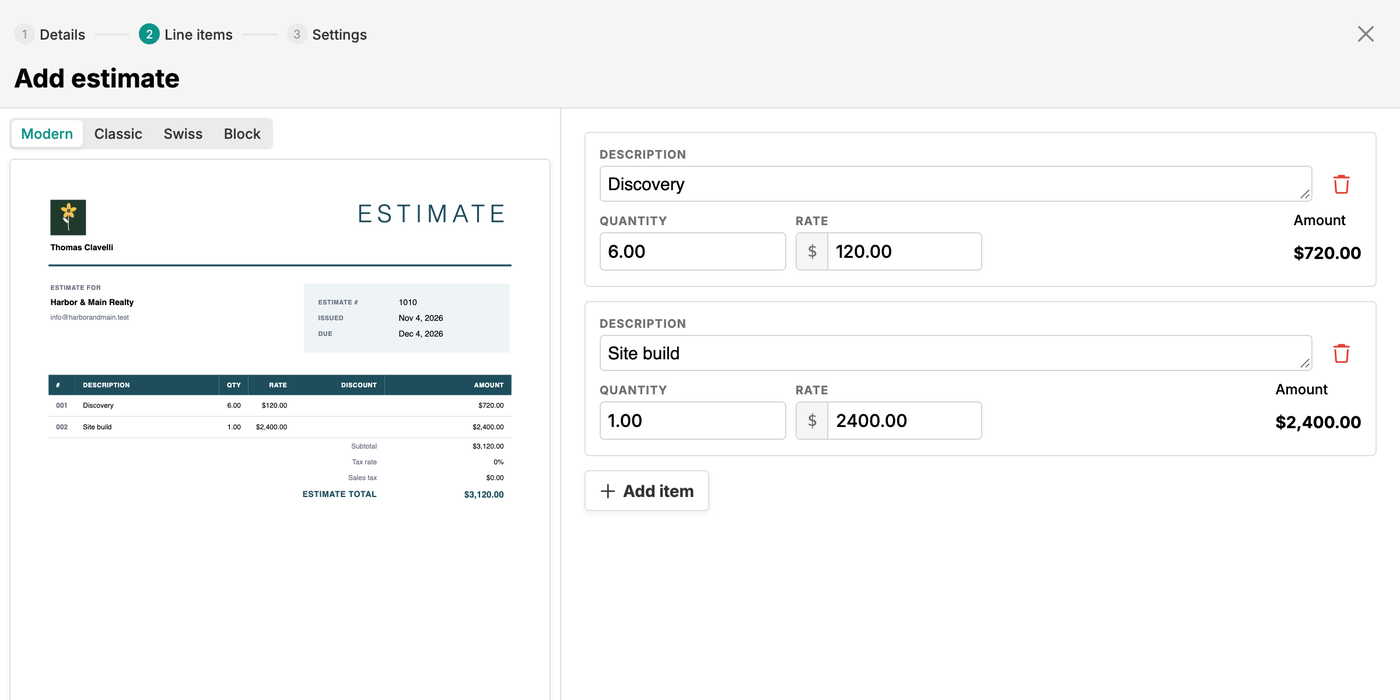
Add line items on one side and watch the estimate redraw on the other, in the Modern, Classic, Swiss, or Block template.

Price the job, keep track of the yes, and turn approved estimates and quotes into projects or invoices without retyping a thing.
Start my free trialWatch the estimate PDF update as you type, and switch between the Modern, Classic, Swiss, and Block templates.
Quantity times rate on every line and one tax rate on the subtotal, with the total updating as you type.
Mark each estimate approved or rejected when the client answers. Pending estimates past their due date show as Overdue.
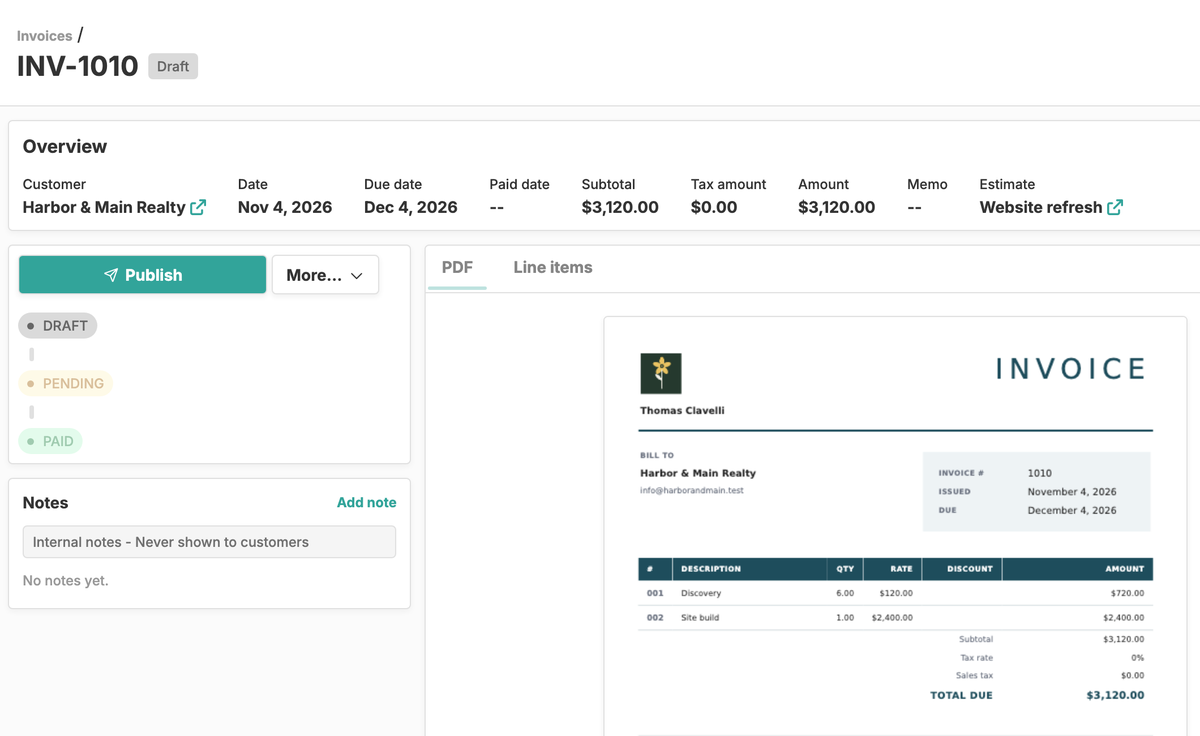
Create a draft invoice with the same customer, line items, and tax, already numbered and dated.
Create a project with a fixed-price milestone contract or a time-and-expense contract built from your lines.
The estimate links to the invoice or project it became, and they link back to the estimate.
Add line items on one side and watch the estimate redraw on the other, in the Modern, Classic, Swiss, or Block template.
Every estimate in one list, with its customer, due date, amount, and a Pending, Approved, Rejected, Overdue, or Converted status.
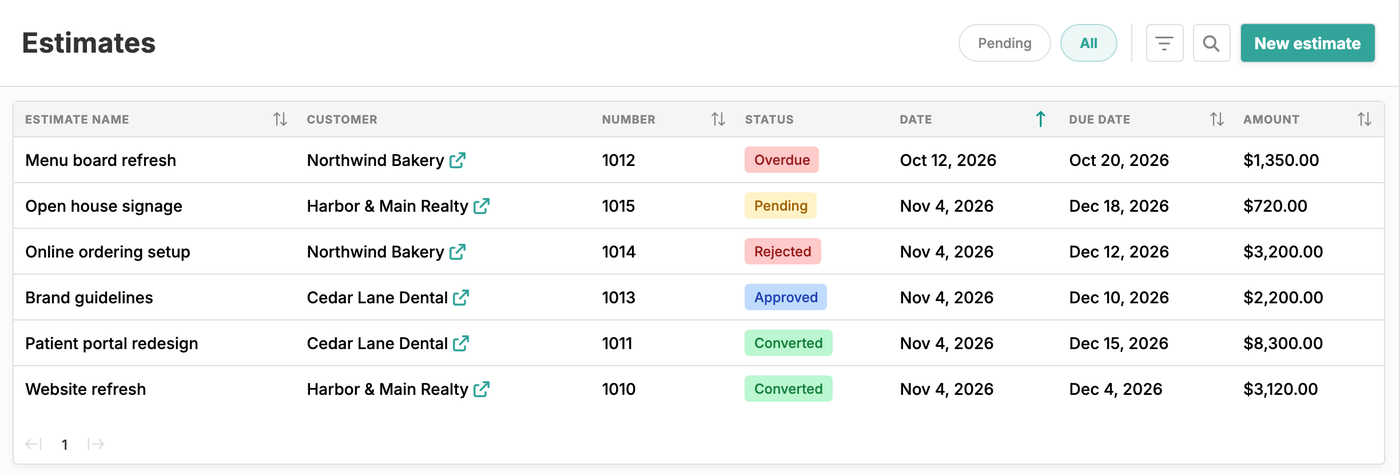
When the client answers, mark the estimate approved or rejected. Approved estimates are ready to become a project or an invoice.
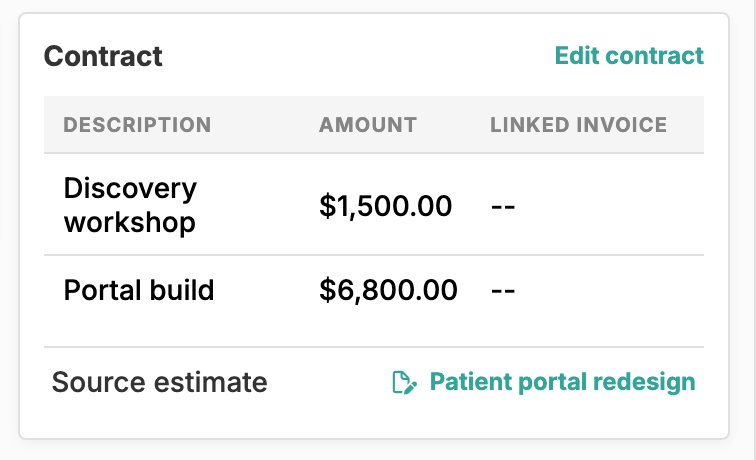
Create project turns each line of a fixed-price estimate into a contract milestone, linked back to the source estimate.
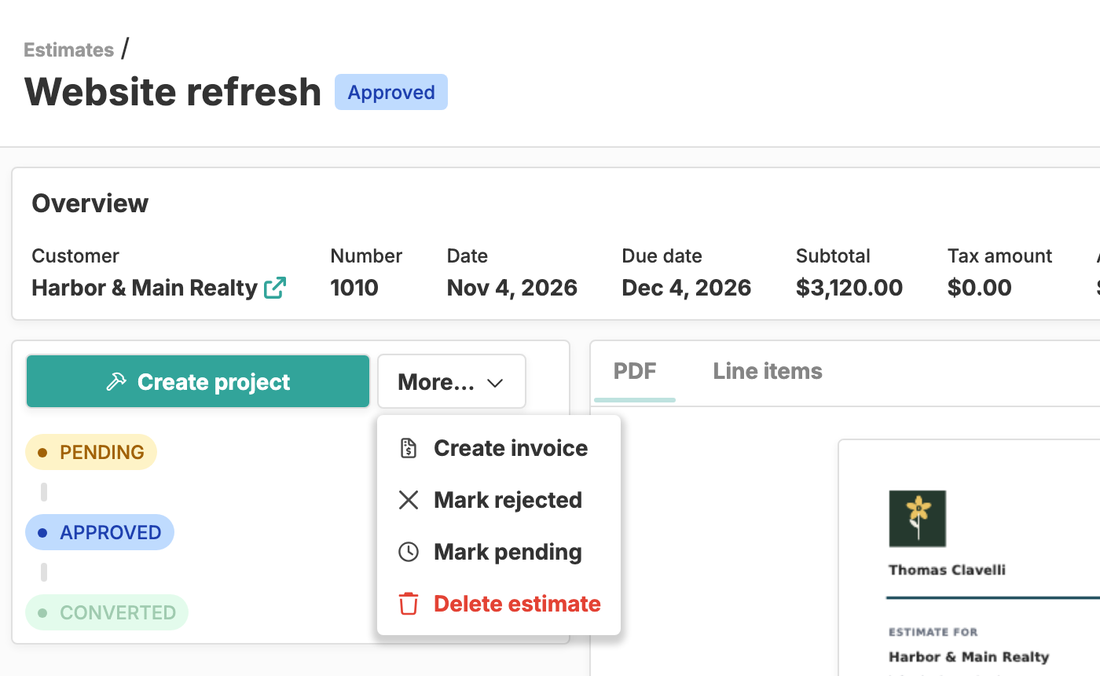
Create invoice turns an approved estimate into a draft invoice with the same customer, line items, and tax. Nothing to retype.
Happy Hours is estimate software for freelancers and small service businesses that bill clients for their time. You price the job next to your customers and projects, keep track of which quotes the client approved, and when the answer is yes, turn the estimate into a project or an invoice in one step. No copying numbers from a document into your invoicing tool.
Estimates and quotes are the same thing here: a priced list of work you give a client before the job starts. The document is titled “Estimate”, whichever word your clients use.
A new estimate walks you through Details, Line items, and Settings. Give it a name, pick a customer, and set a date and an optional due date. The estimate number fills itself in, following whatever numbering you already use, and you can always type your own.
Each line has a description, a quantity, and a rate, and the subtotal, tax, and total update as you go. For hourly work, use hours as the quantity and your hourly rate as the rate. For a fixed price, use one line for the whole job or one per phase. The finished PDF sits right next to the form and redraws as you type, so you can switch templates and see the result straight away.
Download the estimate as a PDF and send it to your client however you normally would. When they answer, mark it approved or rejected. The estimates list shows every quote with its status, and each customer’s page lists theirs.
On an approved estimate, choose Create invoice and Happy Hours drafts an invoice with the same customer, line items, tax rate, and template. It’s numbered and dated, with the due date and payment options from your invoice defaults, so all that’s left is to review it and send.
From there it’s a normal Happy Hours invoice. Email it to the client and let them pay by card or bank transfer through online payments, or mark it paid yourself when a check arrives. The invoice and the estimate link to each other, and if you void the invoice, the estimate goes back to Approved so you can convert it again. Read more about invoicing.
When an approved quote is the start of real work, Create project sets the project up from it, using the contract type you picked in the estimate’s Settings step. With Fixed, each line becomes a milestone you invoice as the work is delivered. With Time and expense, each line becomes an hourly rate for time tracking.
The new project links back to its estimate, so the original quote is always a click away while you manage the project. Converted estimates are locked against edits, so the record of what you quoted stays put.
In everyday freelance work there is very little difference: both are a priced list of work you give a client before the job starts. Some trades treat a quote as a firm price and an estimate as a best guess. In Happy Hours the document is always titled “Estimate”, and you set the line items, rates, tax, and notes.
Yes. On an approved estimate that has a customer, choose Create invoice. Happy Hours creates a draft invoice with the same customer, line items, tax rate, and template, then fills in the invoice number, date, due date, and payment options from your invoice defaults. The estimate and the invoice link to each other.
Download the estimate as a PDF and send it the way you usually do, by email or otherwise. Happy Hours doesn’t email estimates or give clients an online approval page. When the client answers, mark the estimate approved or rejected yourself. The invoice you create from it can be emailed and paid online.
Yes. On an approved estimate, Create project sets up a new project for the customer. With the Fixed contract type, each line becomes a milestone you invoice as the work is delivered. With Time and expense, each line becomes a billing rate for tracked time. The project links back to its source estimate.
Yes. For a one-off estimate, use the free estimate maker: enter your details, your client, and your line items, then download a PDF using the Modern template. No account needed. A Happy Hours account adds the Classic, Swiss, and Block templates, status tracking, and turning approved estimates into projects and invoices.
Yes. Happy Hours is one flat $10/month plan with everything included, so estimates come with time tracking, expense tracking, invoicing, and the rest. There are no feature tiers, no limits on how many estimates you create, and no per-estimate fees. Try it free for 14 days; see pricing for details.